Overview - Compression Based Text Classification
We can perform text classification using a compressor like gzip as described in the paper “Low-Resource” Text Classification: A Parameter-Free Classification Method with Compressors. Under this technique, we assume that a compressor will compress the string more efficiently when strings and are syntactically similar and indicates string concatenation. The compressor does not have any trainable parameters. For inference, we compute the top-K nearest neighbors (neighbors come from the training set ) for a given test sample. The modal class within the top-K samples is the prediction for the test sample. To determine nearest neighbors, we use the following expression:
The paper suggests that also approximates the Kolmogorov Complexity.
NOTE
The code is available on GitHub
Problem - Microcontrollers Cannot Fit The Entire Training Set
The RaspberryPi Pico 2W has a flash memory (non-volatile storage) of size 2 MB which stores data and the firmware (MicroPython in our case). It also has a PSRAM (volatile storage) of 512 KB which stores dynamic runtime data. The infer the class of a given sample using the above mentioned gzip based kNN technique, the model needs access to all samples within the training set.
The training set of any popular text classification dataset is larger than 2 MB. Hence, we need a smaller representation of the training set that can be used within the available storage space on the micro-controller. We need to extract samples that best capture the variance of the training set where . Note, our goal is to reduce the cardinality of the dataset and not the dimensions of each sample (as in dimensionality reduction).
We use K-means clustering on the training set to extract representative samples. As samples in our training set are strings, we use a sentence embedding model all-minilm-l6-v2 to transform the strings into vectors. Strings that are semantically similar will have their corresponding vectors geometrically closer in the embedding space.
import csv
import os
import pickle
from sentence_transformers import SentenceTransformer
from sklearn.cluster import KMeans
import numpy as np
import utils
from collections import defaultdict

# Load the dataset from a remote source or from a cache (if already downloaded)
with open("dataset/imdb/imdb_dataset.csv") as csvfile:
    reader = csv.reader(csvfile, delimiter=',')
    lines = list(reader)
    lines.pop(0)
comments = []
sentiments = []
for line in lines:
    comments.append(line[0])
    if line[1] == "positive":
        sentiments.append(1)
    elif line[1] == "negative":
        sentiments.append(-1)
embeddings = None
if not os.path.exists('dataset/sentiment_embeddings_2.pkl'):
    model = SentenceTransformer("sentence-transformers/all-MiniLM-L6-v2")
    embeddings = model.encode(comments)
    with open("dataset/sentiment_embeddings_2.pkl", "wb") as f:
        pickle.dump(embeddings, f)
else:
    with open("dataset/sentiment_embeddings_2.pkl", "rb") as f:
        embeddings = pickle.load(f)

# Perform k-means clustering with k = 300
n_clusters = 300
kmeans = KMeans(n_clusters=n_clusters)
labels = kmeans.fit_predict(embeddings)

# The cluster centers derived from k-means are not actual data-points from the dataset
# Hence, we iterate through the dataset and find data-points closed to the cluster centres
embeddings_map = defaultdict(list)
for i in range(len(labels)):
    embeddings_map[labels[i]].append(i)
actual_cluster_center_idx = []
for label, embeddings_idx in embeddings_map.items():
    center = kmeans.cluster_centers_[label]
    nearest_idx = embeddings_idx[0]
    nearest_dist = float('inf')
    for emb_idx in embeddings_idx:
        dist = np.sqrt(np.sum(np.square(embeddings[emb_idx] - center)))
        if dist < nearest_dist:
            nearest_dist = dist
            nearest_idx = emb_idx
    actual_cluster_center_idx.append(nearest_idx)

# Write the representative clusters/data-points and their cluster labels
# to a JSON file
utils.samples_to_json(
    [comments[p] for p in actual_cluster_center_idx],
    [sentiments[p] for p in actual_cluster_center_idx],
    "dataset/imdb_samples.json"
)
The utils.py module contains the following function:
import json

def samples_to_json(comments, labels, filename):
    data = {
        "comments": [],
        "labels": []
    }
    for c, l in zip(comments, labels):
        data["comments"].append(c)
        data["labels"].append(l)
    with open(filename, "w") as f:
        json.dump(data, f)
Experiment: Benchmark the Technique
Before running the inference program on the microcontroller, we can execute a benchmark to quickly get some metrics on how well the gzip technique performs on text classification.
import gzip
import utils
import numpy as np
import csv
from scipy import stats
from sklearn.metrics import classification_report

# Load the dataset
with open("dataset/imdb/imdb_dataset.csv") as csvfile:
    reader = csv.reader(csvfile, delimiter=',')
    lines = list(reader)
    lines.pop(0)
comments = []
sentiments = []
for line in lines:
    comments.append(line[0])
    if line[1] == "positive":
        sentiments.append(1)
    elif line[1] == "negative":
        sentiments.append(-1)
comments = comments[:1000]
sentiments = sentiments[:1000]

# Load representative samples
samples, sample_classes = utils.samples_from_json("dataset/imdb_samples.json")
samples_c_len = [len(gzip.compress(x.encode())) for x in samples]
samples = np.array(samples)
samples_c_len = np.array(samples_c_len)
sample_classes = np.array(
    sample_classes
)

# Iterate through different values of 'k'
# to determine the optimal value
for k in range(5, 20):
    def predict(x):
        x = str(x)
        Cs2 = len(gzip.compress(x.encode()))
        distances = []
        for s, Cs1 in zip(samples, samples_c_len):
            Cs1s2 = len(gzip.compress((s + ' ' + x).encode()))
            ncd = (Cs1s2 - min(Cs1, Cs2)) / max(Cs1, Cs2)
            distances.append(ncd)
        sorted_indices = np.argsort(distances)
        top_k_class = sample_classes[sorted_indices[:k]]
        (predict_class, _) = stats.mode(top_k_class)
        return predict_class

    pred_sentiments = []
    for i, x in enumerate(comments):
        pred_class = predict(x)
        if pred_class is not None:
            pred_sentiments.append(pred_class)

    print("for k = ", k)
    print(classification_report(sentiments, pred_sentiments))
For , we get the following results:
for k =  5
              precision    recall  f1-score   support

          -1       0.63      0.69      0.66       499
           1       0.66      0.60      0.63       501

    accuracy                           0.64      1000
   macro avg       0.65      0.64      0.64      1000
weighted avg       0.65      0.64      0.64      1000
The optimal results in our experiment is achieved for :
for k =  15
              precision    recall  f1-score   support

          -1       0.66      0.69      0.67       499
           1       0.68      0.64      0.66       501

    accuracy                           0.67      1000
   macro avg       0.67      0.67      0.67      1000
weighted avg       0.67      0.67      0.67      1000
The numbers are not great considering other solutions for the text classification problem. Anyways, we proceed to execute this classifier on a Raspberry Pi Pico with MicroPython.
Compiling MicroPython for deflate Compression
The default MicroPython firmware build does not include compression capabilities for the deflate module, encouraging us to build the MicroPython firmware ourselves. Clone the project from GitHub:
git clone --depth=1 https://github.com/micropython/micropythonBuild the mpy-cross cross compiler first:
cd micropython
make -C mpy-cross
Modify the ports/rp2/mpconfigport.h file and add the following line:
#define MICROPY_PY_DEFLATE_COMPRESS (1)Navigate to the ports/rp2 directory and build the firmware:
make BOARD=RPI_PICO2_W submodules
make BOARD=RPI_PICO2_W clean
make BOARD=RPI_PICO2_W
The firmware.uf2 file for the firmware is generated in the ports/rp2/build-RPI_PICO2_W directory. Put the RPi Pico in the BOOTSEL mode, copy firmware.uf2 to the filesystem of the Pico (in BOOTSEL, Pico is viewed as a storage device to the host machine) and eject the Pico from the host machine.
Running The Classifier on the Pico with MicroPython
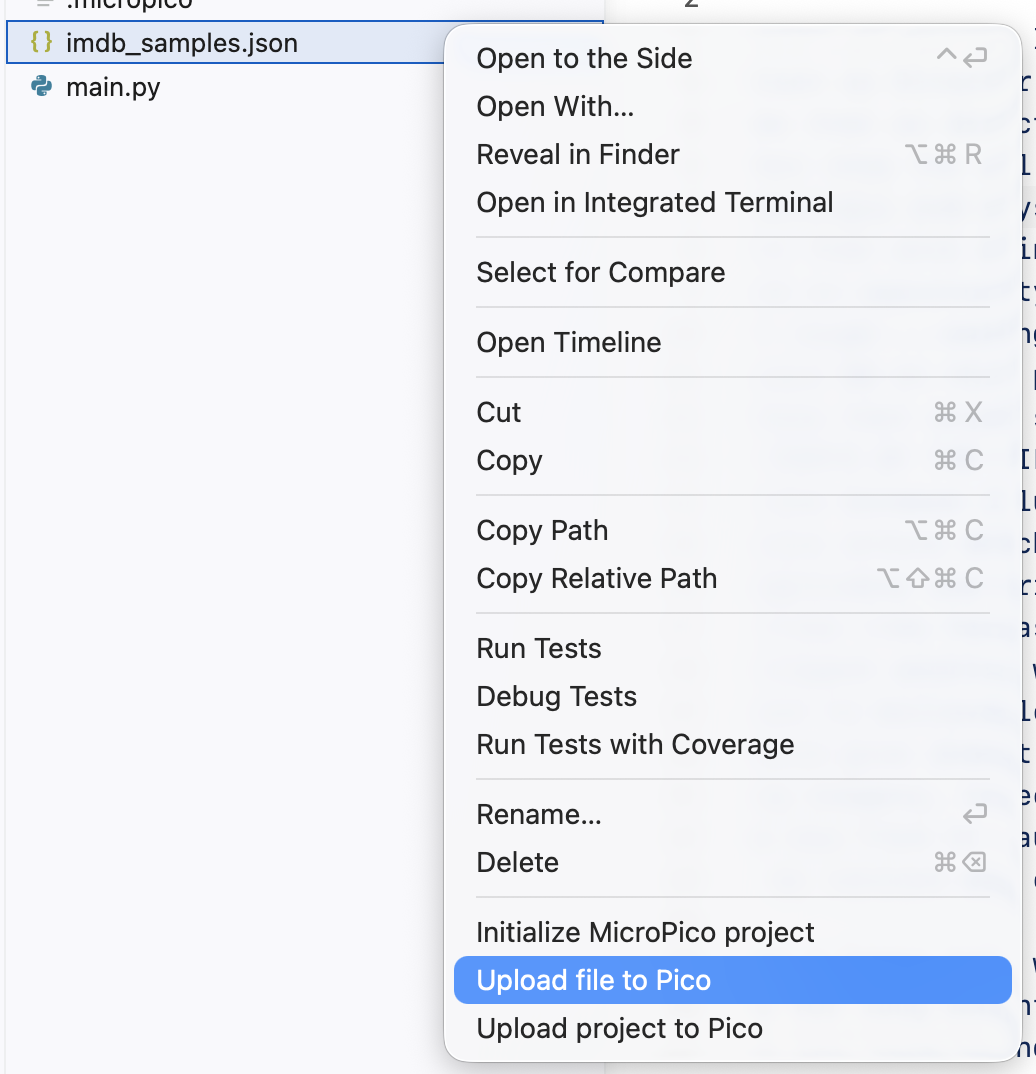
First, we need to transfer the representative samples i.e. the imdb_samples.json file to the Pico’s file-system (precisely, a virtual file-system created by MicroPython). If you are using the MicroPico extension from VSCode, it has an option to upload files:
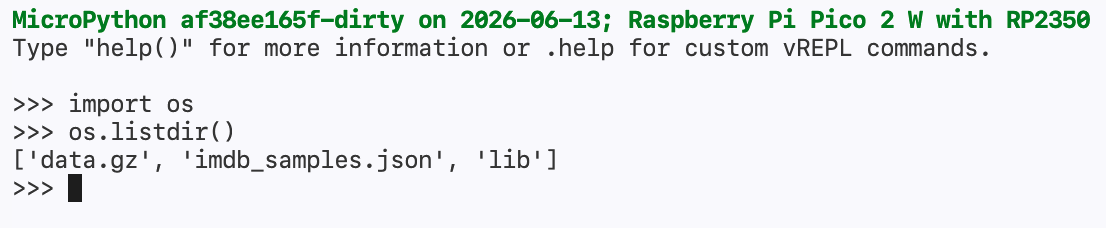
To verify, execute os.listdir() in MicroPython REPL:
We use the following script to execute our gzip based text classifier:
import json
import gc
import gzip
import micropython

with open("imdb_samples.json", "r") as f:
    samples = json.load(f)

labels = samples["labels"]
comments = samples["comments"]
assert len(labels) == len(comments)
n = len(labels)
Cs1_arr = [len(gzip.compress(x)) for x in comments]
k = 15

def predict(sentence: str) -> int:
    Cs2 = len(gzip.compress(sentence))
    distances = []
    for i in range(n):
        Cs1 = Cs1_arr[i]
        s1s2 = ' '.join([comments[i], sentence])
        Cs1s2 = len(gzip.compress(s1s2))
        ncd = (Cs1s2 - min(Cs1, Cs2)) / max(Cs1, Cs2)
        distances.append([labels[i], ncd])
    sorted_indices = sorted(distances, key=lambda x: x[1])
    sorted_indices = sorted_indices[:k]
    top_k_classes = [p[0] for p in sorted_indices]
    score = sum(top_k_classes)
    return score

while True:
	# DEBUG: print micropython memory consumption
    # micropython.mem_info()
    query = input("Enter sentence: ")
    score = predict(query)
    print(score)
    gc.collect()
Executing the program on the Pico:

As we can observe, the text classifier does not perform well despite the 0.67 macro-averaged accuracy achieved in the benchmark.
Possible Limitations and Takeaways
- Computing
ncddoes not respect the semantic similarity between two sentences. This is, in turn, a limitation ofgzipcompression which does not capture/retain semantic meaning within the sentence, rather it focuses only on the structure/syntax of the syntax (repeat subsequences). - The
gziptechnique is miniature considering the compute resources it requires. If the accuracy of the classifier can be enhanced, deploying the classifier on a constrained device like a micro-controller is easy. - The IMDB movie reviews dataset used in the demonstration contains longer text sequences. The sentence embedding model is powerful enough to compress these sequences and return fixed-length vector representations. These vectors are then used to derive the representative data-points from the training set. The
gzipcompressor is not powerful enough to produce such rich compressions at inference time.